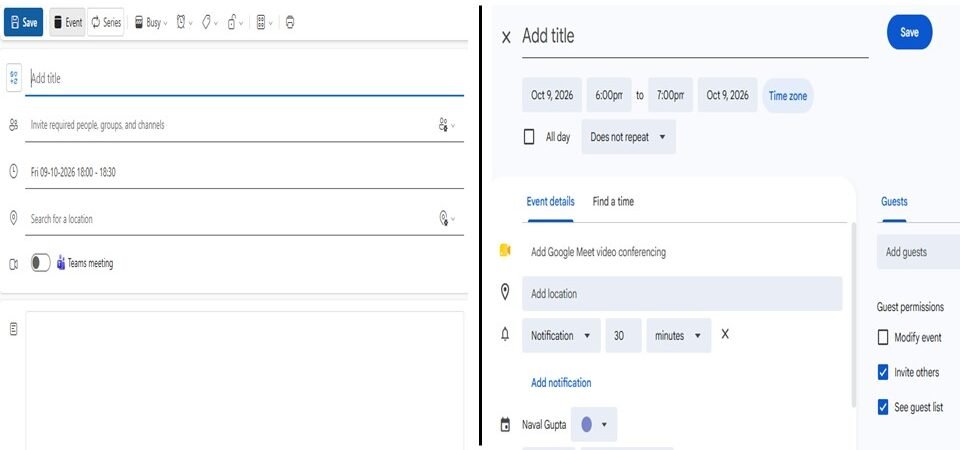
In a fast-paced hybrid workspace, time is the most valuable corporate currency. Managing that currency happens almost entirely through digital schedules like Google Calendar and Microsoft Outlook.
However, scheduling a meeting is often handled less diligently than an email, more like a tick in the box, to be done quickly kind of task, which we think should not waste hours of our focus. Sending a sudden, blank calendar block or ignoring an incoming request creates immediate poor perceptions about our professionalism. Given invitations are an inevitable part of our daily work, managing them properly is a critical part of our professional’s identity, signaling how much we respect our own time and the time of our colleagues.
At the Corporate Skills Lab, we treat time and task management as a strict science. Here is the definitive guide to calendar invite etiquette, covering essential protocols for both the sender and the recipient across virtual and physical workspace.
🔬 Part 1: Etiquette as a Sender (Creating the Invite)
- Never send Context-Free Invites
Sending a raw calendar block with just a vague title like “Catch up” or “Discussion” without any context is poor professional manners. It forces the recipient to guess the purpose of the meeting, causing unnecessary anxiety or preparation gaps. Imagine such an invite coming from HR while there is news of layoffs circling around the water cooler.
- The Rule: Every calendar invite must include a brief, bulleted agenda in the description box. Clearly state why the meeting is happening, what will be decided, and who needs to participate for what part.
- Verify Availability of Attendees Before Booking
Never drop a calendar block blindly onto a colleague’s schedule without checking their availability first. Flooding someone’s calendar with random invites that conflict with their existing blocks is highly disruptive.
- The Rule: Always use the “Scheduling Assistant” or “Find a Time” tabs to review the shared availability of your attendees before choosing a time slot. In case everything looks blue (booked) with no common available slot, then don’t send the invite, instead send an email with 2-3 suggested slots (where most people look free) and ask them to choose. In case someone can’t make it at all, check if they are ok for the meeting to still go ahead, and you can send them minutes post the session.
- Attach Every Single Access Point Proactively
Forcing team members to search through older chat threads or email chains to find a relevant document, a video link or a meeting room location right when a session is starting slows down efficiency and may get frustrating for them.
- The Rule: If the meeting is virtual, verify that the Microsoft Teams, Zoom, or Google Meet link is automatically embedded. If the meeting is physical, reserve the specific conference room in the system layout and add the room number directly to the location box.
- Identify Required vs. Optional Attendees
Adding a massive list of people to an invite without clarifying their role forces unnecessary attendance, lowering overall office productivity.
- The Rule: Use invitation lists carefully. Mark core decision-makers as Required. Mark stakeholders who only need a status summary as Optional, adding a note in the description that their attendance is completely at their discretion.
🔬 Part 2: Etiquette as a Recipient (Managing the Request)
- Do a Rapid RSVP Response
Leaving a calendar request sitting in a “Tentative” or no response state indefinitely is a major corporate bottleneck and perception spoiler. It stops the sender from finalizing project timelines or organizing external schedules, and it conveys lack of etiquette from the recipient.
- The Rule: Respond to every calendar invite within maximum 24 hours of receiving it. Click Accept, Decline, or Propose a New Time so the organizer can track team numbers accurately.
- Always Provide Context When Declining
Clicking “Decline” or “Tentative” on an invitation without adding a brief note can look dismissive or uncooperative, and lack communication etiquette.
- The Rule: When declining a request, utilize the optional text box to share a brief explanation. If you can then delegate someone else from your team to attend instead.
- Propose Alternative Slots Proactively
If a critical alignment meeting conflicts with a prior assignment, do not simply decline the request to close the loop.
- The Rule: Use the Propose a New Time feature built in calendar tools. Suggest a clear alternative slot where your availability grid is wide open, helping the organizer find an option quickly.
🧠 The Dual Alignment: Keep It Seamless
Whether sending an invite or responding to one, matching calendar actions with clear communication is key. If a meeting must be canceled or shifted at the last minute due to an exigency, do not rely on the calendar update alone to notify the team. Drop a direct text update on instant messaging channels or write a crisp email to apologize for the schedule shift.
Managing your digital calendar should align directly with your overall communication style. Review our complete guide to modern corporate email etiquette to learn how to write clear, structured emails and manage professional boundaries cleanly.
🧪 The Lab Report Summary: The Final Verification
Digital calendars are collaborative workspace tools, not personal task logs. By providing a clear agenda inside every invite, checking availability before booking, responding to requests promptly, and keeping access simple, teams can run efficiently. Respecting collective time through clean calendar habits lowers fatigue and builds a reputation of reliability and professional discipline.